SAP access risk management
Find and fix SoD risks before they become a problem.
ClearDuty analyses segregation of duties across your SAP landscape at authorization object, field and value level — so your team reviews conflicts that are real, with the evidence to prove each one.
Why now
The access review is getting harder to postpone.
Regulators now ask for access control by name, the SAP GRC 12 platform is approaching the end of its maintenance, and every S/4HANA migration rebuilds the role catalogue. Each of these lands on the same small security team.
In force · since Oct 2024
NIS2, Article 21
Essential and important entities must have access control policies and check that their measures work. ERP access is part of that.
In force · since Jan 2025
DORA for financial entities
ICT risk rules expect least privilege and documented, regularly reviewed access rights — with evidence.
Planned · 31 Dec 2027
End of SAP GRC 12 maintenance
Teams choosing between Access Control on HANA, Cloud IAG or something lighter need an independent view of their risks first.
Planned · 31 Dec 2027
ECC mainstream maintenance ends
S/4HANA projects redesign roles around Fiori and SAP_BR_* business roles. SoD is cheapest to fix while the roles are still on paper.
Dates as published by the European Union and SAP at the time of writing; check your own SAP maintenance agreement. Details in the knowledge base.
Why ClearDuty
Built by an SAP access consultant, for the people who do the review.
Tools that match transaction codes alone report every user who could theoretically do two things. Reviewers lose weeks dismissing findings that were never real. ClearDuty starts from the authorization values, so the list you work through is the list that matters.
Nothing leaves your network
No server, no upload, no telemetry. Everything runs in the browser. For a live link, the ClearDuty Connector sits inside your network and reads SAP read-only over RFC.
Your rules, not ours
Load your own ruleset or your SAP GRC export. Mark any rule not applicable with a reason — it is reported as excluded, never quietly deleted.
Answers before the change
Simulate removing a role before you touch SAP, design a least-privilege role from SAP standard business roles, and look up any transaction or Fiori app to see which role should own it.
Evidence an auditor accepts
Twelve readiness checks, source files fingerprinted with row counts, reviewer sign-off tied to the exact result, GRC reconciliation and a complete change log.
Real or theoretical
Load ST03N usage and every finding shows whether both sides were actually executed, so the team starts with genuine exposure instead of a flat list.
Names stay private
Pseudonymise user IDs and role names with one click, with the re-identification key kept separately — for when the report leaves the security team.
The tool
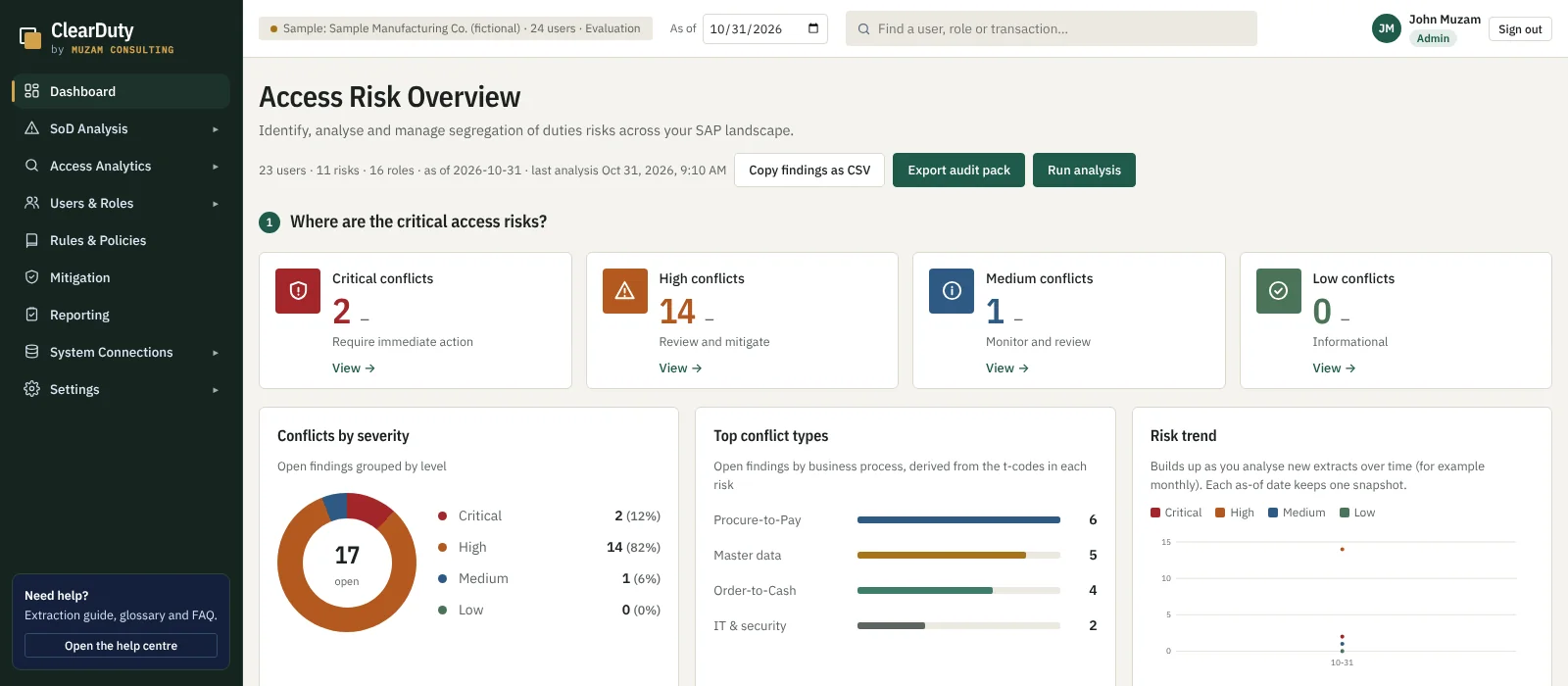
Four questions, answered on one screen.
Where are the critical risks, which users and roles create them, which findings are genuine, and what should be done about each one.
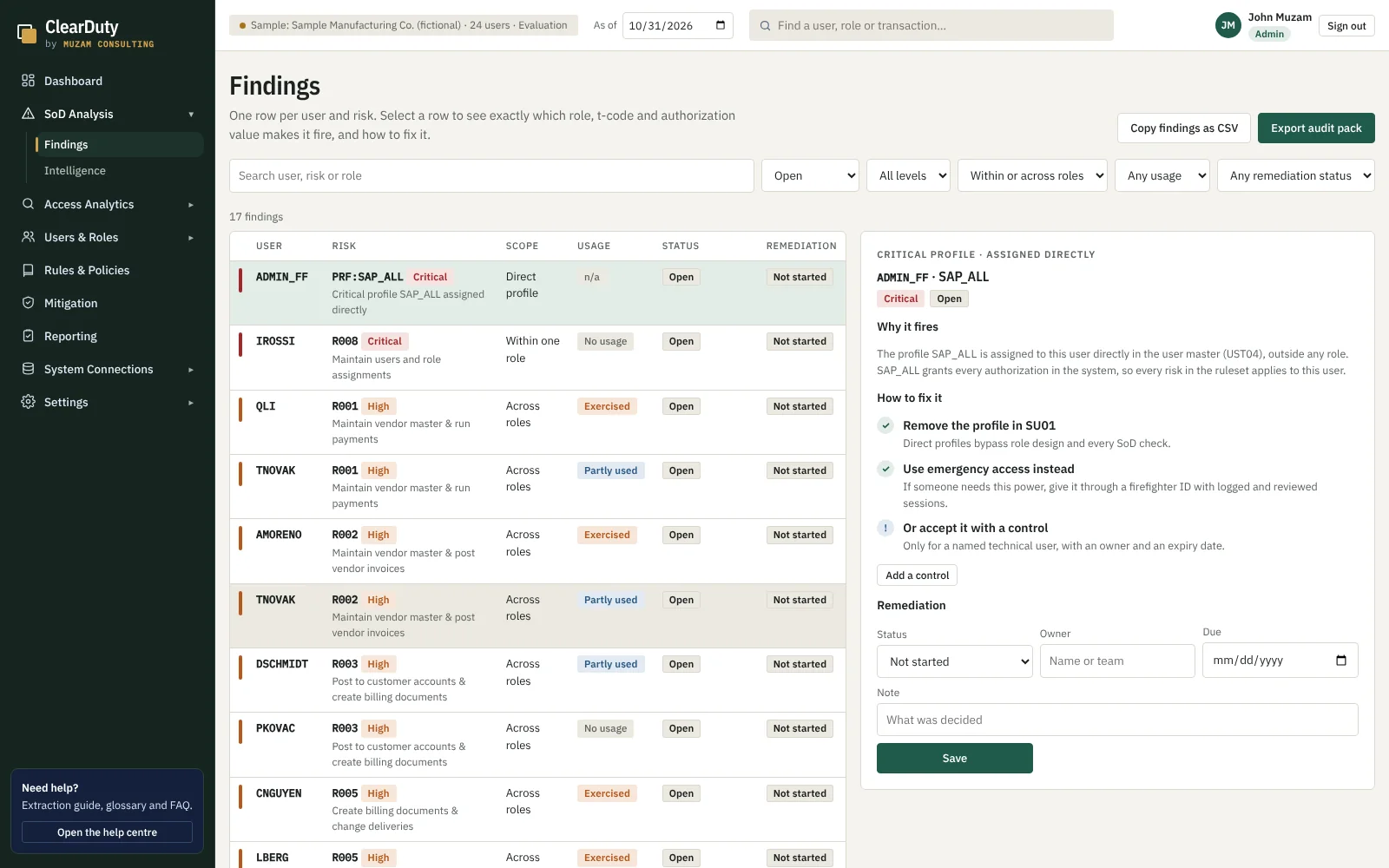
Every finding explains itself
Select a row and see precisely why it fired: both business functions, the transaction on each side, which role grants it, and the authorization object, field and value that complete the match.
- The single role removal that clears the finding
- An unused side that can simply be trimmed
- A wildcard value that can be narrowed
- Or a documented hand-off, when the job needs both
Your ruleset, under your control
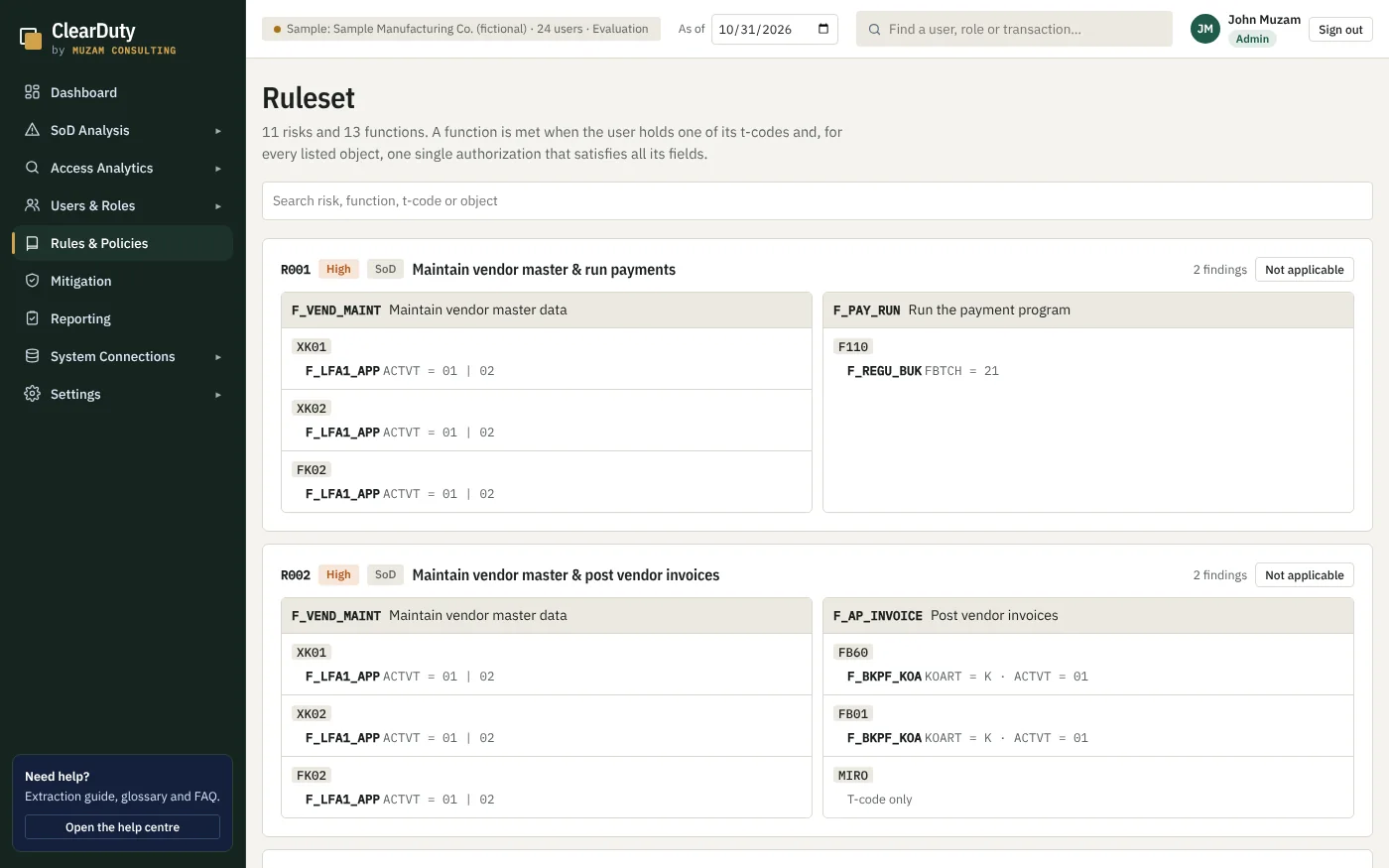
Risk, function, action, object, field and value — the whole rule is visible and editable. Rules that do not apply to your company are switched off with a reason and reported as exclusions.
- Alternative permissions and org-level rules such as company code
- Critical permissions with no transaction at all
- Non-discriminating objects shown, never blamed
- GRC column names recognised automatically
Walk into the audit with the answer already written
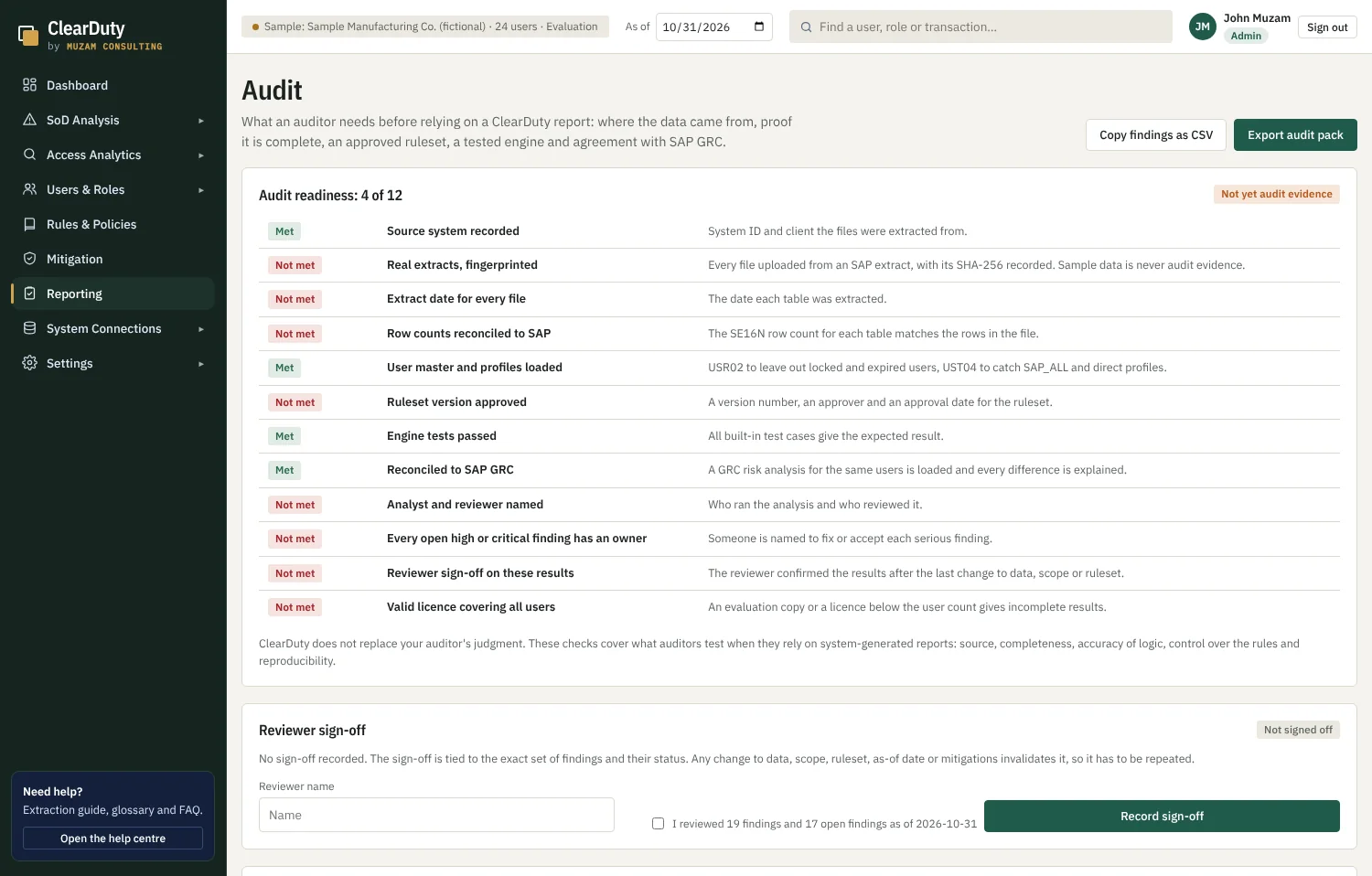
Twelve readiness checks tell you before you export whether this run qualifies as evidence. The workbook that comes out contains the findings, the authorization-level proof behind each one, the controls, the engine test results, the source files with their fingerprints and a change log.
- Source system, client and extract date recorded
- Row counts reconciled against SE16N
- Reviewer sign-off invalidated by any later change
- Differences against SAP GRC explained line by line
How it works
Three steps, about twenty minutes.
No project, no agent, no landscape change. If you can run SE16N, you can run ClearDuty this afternoon.
Export from SAP
Four tables through SE16N: role authorizations, user assignments, composite roles and the user master. The Help centre lists the exact fields. A GRC export or the ClearDuty Connector works just as well.
Drop the files in
Column names from SAP tables and GRC reports are recognised automatically. The analysis runs instantly in your browser; nothing is uploaded anywhere.
Review and hand over
Work through the findings, record decisions and owners, then export one workbook your auditor can follow without asking you a single question.
Industries
Role templates for the way your sector actually works.
A refinery, an airline and a bank do not share a job catalogue. ClearDuty ships role templates for 23 sectors, each one a starting point you adapt rather than a theory you argue with.
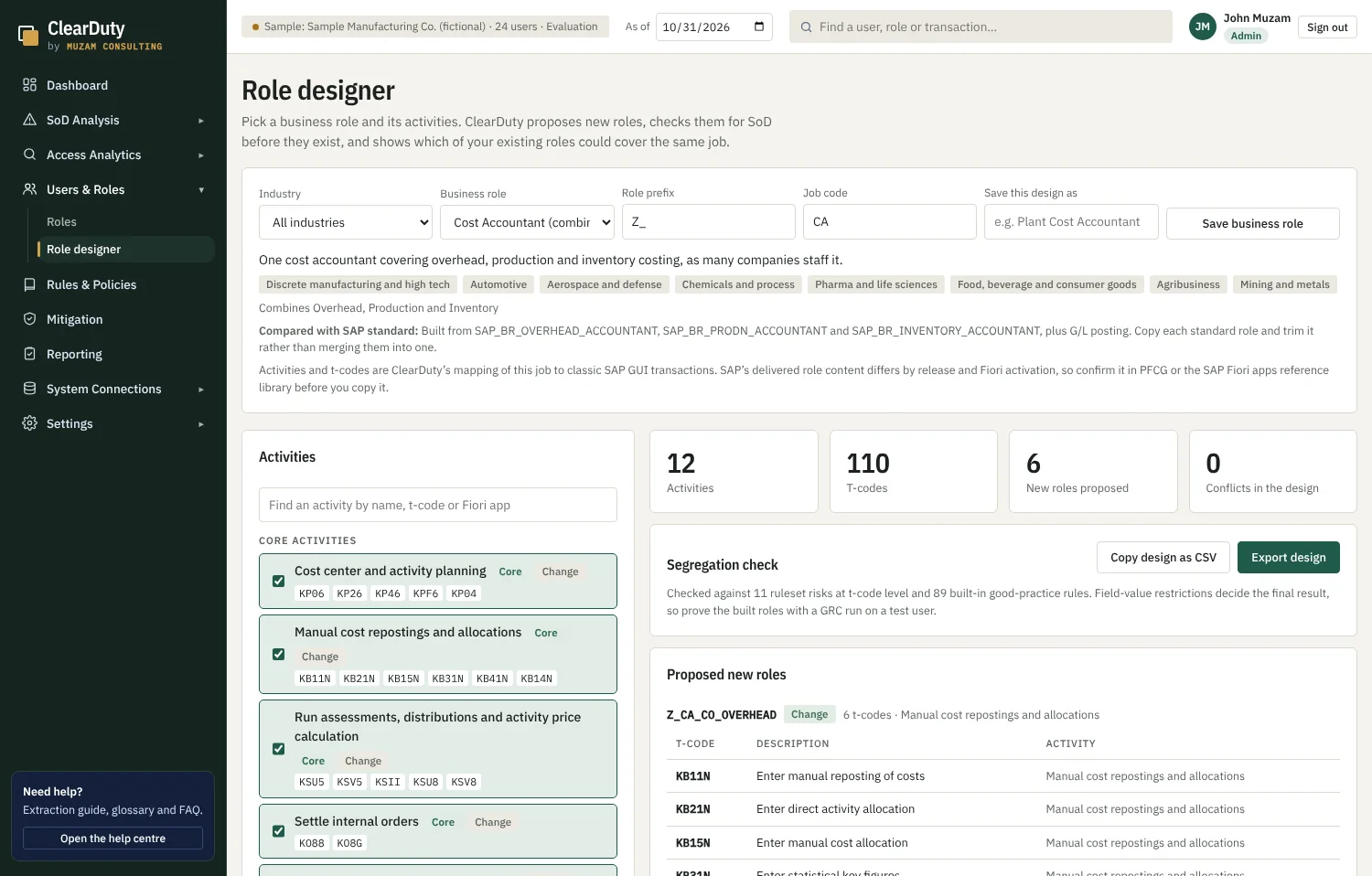
Build the role before you build the role
Pick a job, pick the activities it genuinely needs, and ClearDuty checks the combination against the ruleset as you go — then names the SAP standard business role to copy in PFCG.
Pricing
Start free. Pay when it goes into production.
No procurement cycle to try it, and no per-seat maths. One licence covers the company.
Evaluation
Free
- Full analysis on sample data
- Up to 25 of your own users
- Every screen and export, marked as evaluation
- No sign-up, nothing installed
Standard
Annual licence, per company
- Unlimited users in your SAP system
- Your own ruleset or GRC import
- Audit pack issued in your company name
- Accounts, roles and reviewer sign-off
- Email support and updates
Enterprise
Annual licence, multi-system
- Everything in Standard
- ClearDuty Connector for live extracts
- Several SAP systems and clients
- Single sign-on through your identity provider
- Ruleset workshop and onboarding
Knowledge base
Everything you need to run your first review.
Step-by-step guides written for SAP security teams and auditors: what to export, how to read a finding, and how to hand over evidence.
Questions
Straight answers.
Does my SAP data leave my computer?
No. ClearDuty is a web page that runs the analysis in your browser. The files you load are read locally and kept in your browser's own storage. There is no server behind the tool, nothing is uploaded, and it keeps working with the network switched off.
How is this different from matching transaction codes?
A conflict fires only when the user holds the transaction and the authorization values that make it usable — the object, the field and the value, including organisational levels such as company code. Objects that do not discriminate are shown as context but never blamed. That is the difference between a finding a business owner accepts and one they argue with.
Can we use our own ruleset?
Yes, and most companies should. Upload your own rules or your SAP GRC ruleset export — the importer recognises GRC's own column names. You can also mark individual rules as not applicable, with a reason that is recorded and reported as an exclusion rather than deleted.
What do we need to export from SAP?
Four tables are enough to start: AGR_1251, AGR_USERS, AGR_AGRS and USR02. Add UST04, AGR_1252, TSTCT and ST03N usage for a complete picture. The Help centre inside the tool lists the exact fields and the SE16N steps.
Is the output good enough for an external audit?
That is what it is designed for. The export contains the findings, the authorization-level evidence behind each one, the compensating controls, the engine test results, a reconciliation against GRC if you supply it, the source files with their SHA-256 fingerprints and row counts, and a change log. Twelve readiness checks tell you before you export whether the run qualifies as evidence.
Can it connect to SAP directly?
Yes, through the ClearDuty Connector: a small program your Basis team runs inside your network. It reads the tables over RFC with a read-only service user and serves them to the tool. It only ever reads, and the data never leaves your network.
Does it use AI?
The analysis engine is fully deterministic — the same inputs always produce the same findings, which is what an auditor requires. There is an optional local Intelligence view that ranks and explains findings using a scoring formula printed on screen. No generative AI model is connected, and nothing is sent to an AI provider.
Which SAP releases does it work with?
Any release whose authorization tables you can export, from ECC 6 to S/4HANA. The built-in transaction catalogue covers the common standard transactions, and uploading TSTCT from your own system makes the coverage exact for your release, including transactions added by support packages.
Who is behind ClearDuty?
Muzam Consulting, an SAP access and controls practice based in Wrocław, Poland. ClearDuty was built out of client work on SAP role redesign and SoD remediation, by the person who had to produce the evidence packs.
See your own conflicts in twenty minutes.
Open the tool with sample data, then load your own export when you are ready. Nothing to install, nothing to sign up for.